

Getting people to visit your website is a great start. But what happens after they arrive? For many businesses, this is where things become frustrating. Website traffic is increasing, Google rankings are improving, and visitors are spending time exploring different pages. Yet the number of enquiries, sales and new customers remains disappointingly low. Sound familiar?
The problem might not be your traffic. It could be the way your website communicates with visitors, presents your services or guides people towards making a purchase. Think about it. Someone visits your website because they are looking for something. Perhaps they need a service, want to compare different providers or are simply researching a problem. Your job is to give them a good reason to stay, build enough confidence to earn their trust and make the next step as straightforward as possible. That’s what website conversion is all about.
In this guide, we’ll explore how to turn website visitors into customers through 10 practical steps. Whether you run a small business, manage an online store or provide professional services, these strategies can help you get more value from the traffic you’re already receiving.
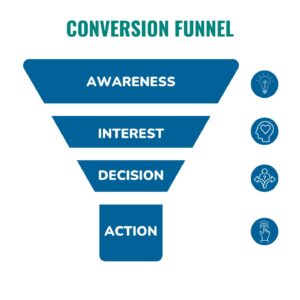
What Does It Mean to Convert Website Visitors Into Customers?
Website visitor conversion happens when someone visiting your website completes an action that moves them closer to becoming a customer. That action doesn’t always mean making an immediate purchase.
For one business, it could be someone requesting a quotation. For another, it might be booking a consultation, subscribing to an email newsletter, downloading a resource or submitting a contact form.
The journey usually involves several stages:
Attract: Bring relevant visitors to your website through SEO, social media, advertising and referrals.
Engage: Give visitors useful information that addresses their needs.
Build trust: Show why your business is a reliable choice.
Convert: Encourage visitors to make an enquiry, book a call or purchase.
Retain: Continue the relationship through good service and follow-up communication.
The important thing to understand is that not every visitor is ready to buy immediately. Some need more information, while others are comparing different businesses. Your website should accommodate both.
10 Steps to Turn Website Visitors Into Paying Customers
1. Understand Who Is Visiting Your Website
Before trying to increase sales, take a closer look at the people already visiting your website. Who are they? Where are they coming from? What are they searching for? And what are they hoping to find?
Understanding your audience helps you create a website experience that speaks directly to potential customers rather than trying to appeal to everyone.
For example, imagine you provide digital marketing services to small businesses.
A visitor searching for “what is search engine optimisation” might be interested in learning about SEO. Someone searching for “affordable SEO services for small businesses” is probably considering hiring a provider.
Both visitors are valuable, but they have different needs.
How to put this into practice:
Use Google Analytics 4 to understand your traffic sources and visitor behaviour.
Review Google Search Console to identify the queries bringing people to your website.
Study your most visited pages.
Identify which pages generate enquiries and sales.
Research the common problems and questions your target customers have.
Once you understand your audience, you can create more relevant content, improve your landing pages and make your marketing messages more effective.
2. Make Your Website’s Value Proposition Clear
Visitors shouldn’t have to guess what your business offers. When someone lands on your homepage, they should quickly understand what you do, who you help and what makes your business worth considering.
Unfortunately, many websites make this harder than necessary. They use generic headlines, complicated descriptions and marketing language that sounds impressive but communicates very little. Consider these two examples.
Generic headline:
“Taking Your Business to the Next Level.”
Clearer headline:
“Digital Marketing Services That Help Small Businesses Generate More Leads and Customers.”
The second headline tells visitors exactly what they can expect.
A good value proposition focuses on the customer’s problem and explains how your business can help solve it.
How to put this into practice:
Write a clear headline explaining your main service or product.
Add a supporting sentence describing the benefit.
Highlight what makes your business different.
Avoid unnecessary technical language.
Place an appropriate call to action near the headline.
Remember, your website isn’t there to impress visitors with complicated wording. It’s there to help them understand why your solution is relevant.
3. Create Landing Pages That Match Visitor Intent
Sending every visitor to your homepage isn’t always the best approach. Different people arrive with different expectations. Someone searching for a specific service should ideally land on a page explaining that service rather than having to navigate through your entire website. This is where dedicated landing pages become important.
A landing page is designed around a particular audience, offer or marketing objective. Its purpose is to guide visitors towards one primary action.
For example, if you offer SEO services, a dedicated SEO landing page could explain:
What your SEO services include.
Which businesses you work with.
The problems your service addresses.
How your process works.
What clients can expect.
How to request a consultation.
The same principle applies to paid advertising, email marketing and lead generation campaigns.
How to put this into practice:
Create dedicated landing pages for your main services, products and campaigns. Match the page headline with the message that brought the visitor there. Keep the content focused, provide useful information and make the next action obvious.
A well-structured landing page can make a meaningful difference to your website conversion rate because it reduces confusion and gives visitors a more relevant experience.
4. Use Strong Calls to Action That Encourage Action
Imagine someone visiting your website, reading your services page and becoming interested in working with you. They are ready to take the next step, but there’s no obvious contact button. What happens?
They might search for your contact details, become frustrated or simply leave. This is why calls to action (CTAs) are an important part of website conversion optimization. A CTA tells visitors exactly what to do next.
Examples include:
Get a Free Quote
Book Your Consultation
Start Your Project
Request a Website Audit
Shop Now
Download Your Free Guide
Talk to Our Team
However, simply adding buttons isn’t enough. Your CTA should make sense in the context of the page. For example, a visitor reading an educational blog post might be more comfortable downloading a free guide than immediately booking a consultation. On a service page, however, a “Request a Quote” button may be more appropriate.
How to put this into practice:
Place your primary CTA where visitors can easily find it. Use clear, action-oriented wording and make sure the destination works correctly. You can also test different CTA messages to understand which ones generate more enquiries.
5. Build Trust Through Reviews, Testimonials and Social Proof
People are naturally cautious when spending money, particularly when dealing with a business for the first time. Before making a decision, they often want to know whether other customers have had a positive experience.
This is where social proof becomes valuable. Customer reviews, testimonials, case studies and genuine examples of previous work can help remove doubts and build confidence.
Think about your own buying behaviour. When choosing a service provider, you probably want to see evidence that they can deliver what they promise. Your website visitors are no different.
How to put this into practice:
Include genuine customer testimonials on relevant service pages. Showcase case studies explaining the problem, your approach and the outcome. Display authentic customer reviews where appropriate and provide clear information about your company. If you are a new business without many testimonials, don’t manufacture them. Instead, demonstrate your expertise through useful content, transparent processes, portfolio examples and detailed service explanations.
Trust takes time to establish, but it can make a significant difference when someone is deciding whether to become your customer.
6. Improve Website Loading Speed and Mobile Experience
A slow website can damage the customer experience before visitors even get a chance to explore your services. People expect websites to load quickly and work properly across different devices. If your pages take too long to load, buttons don’t respond or the mobile layout is difficult to navigate, potential customers may leave before taking action. This is particularly important for businesses that receive traffic from mobile search, social media and advertising.
How to put this into practice:
Compress large images without sacrificing too much quality.
Reduce unnecessary scripts and plugins.
Use reliable website hosting.
Enable browser caching where appropriate.
Make sure your website is responsive.
Check that buttons and forms work on mobile devices.
Review your Core Web Vitals using Google PageSpeed Insights.
Don’t focus exclusively on desktop performance. Test the complete customer journey on a mobile phone as well. A website should make it easy for someone to discover your business, explore your services and contact you regardless of the device they’re using.
7. Make Your Contact and Checkout Process Simple
You’ve attracted the right visitor, explained your offer and built trust. Now comes the important part: making it easy for them to take action. Unfortunately, unnecessary steps can get in the way. A contact form requesting too much information, a confusing checkout process or a complicated booking system can discourage potential customers. The simpler the process, the fewer obstacles visitors need to overcome.
How to put this into practice:
For a typical business enquiry form, start with essential information:
Name
Email address
Phone number (if needed)
Brief description of the enquiry
You can collect additional details during the follow-up conversation. For e-commerce websites, make sure customers can easily review their orders, understand delivery costs and complete payment without unnecessary distractions. Also, offer convenient contact options such as phone, email or WhatsApp where appropriate. Most importantly, test every form and checkout process regularly. A broken enquiry form can quietly cost your business valuable opportunities.
8. Offer Something Valuable Before Asking for a Sale
Not every visitor arrives ready to purchase. Some people are still researching their options, comparing service providers or trying to understand which solution is right for them. Instead of pushing every visitor towards an immediate sale, consider offering something useful that encourages them to maintain a relationship with your business. This is where lead magnets can help. A lead magnet is a free resource or offer that provides value in exchange for contact information.
Examples include:
Free industry guides
Downloadable checklists
Website audit reports
Educational eBooks
Templates and worksheets
Free consultations
Product demonstrations
For example, a digital marketing agency could offer a free SEO checklist to business owners who want to improve their website visibility. Someone downloading that checklist might not become a customer today, but they could be interested in professional SEO services in the future.
How to put this into practice:
Identify a common problem your target audience experiences and create a resource that helps address it. Promote the resource through relevant blog posts, landing pages and email campaigns. Make sure the offer is genuinely useful. The objective is to start a meaningful relationship, not simply collect email addresses.
9. Follow Up With Visitors Who Show Interest
One of the biggest mistakes businesses make is assuming that someone who doesn’t purchase immediately is no longer interested. In reality, people often need time before making a decision. They might be comparing prices, discussing the purchase with someone else or waiting for the right time. A structured follow-up process helps keep your business in consideration.
For example, someone downloads your guide or requests a quotation. You can follow up with relevant information, answer their questions and explain how your service might help.
How to put this into practice:
Set up an automated welcome email for new subscribers.
Respond to enquiries promptly.
Send helpful follow-up information.
Share relevant case studies and customer testimonials.
Use a CRM system to organise potential customers.
Follow up with people who requested a quotation but haven’t responded.
Email marketing can be particularly useful here because it allows you to communicate with interested prospects over time. However, keep your messages relevant and respect consent and unsubscribe requirements. The aim is to remain helpful and available rather than overwhelming people with promotional emails.
10. Measure Results and Continuously Improve Your Website
Website conversion isn’t something you fix once and forget. Customer behaviour changes, marketing campaigns evolve and different pages perform differently over time. That’s why tracking your results is essential. Instead of focusing only on website traffic, measure the actions that contribute to business growth.
Some useful metrics include:
Website conversion rate.
Contact form submissions.
Qualified leads.
Consultation bookings.
Phone calls.
Product purchases.
Email sign-ups.
Revenue generated from website visitors.
For example, imagine your website receives 2,000 visitors in one month and generates 40 enquiries.
Your enquiry conversion rate is 2%.
If you improve your website and generate 60 enquiries from the same 2,000 visitors, the rate becomes 3%.
That’s 20 additional enquiries without increasing traffic.
The calculation is:
Conversion Rate = (Number of Conversions ÷ Total Visitors) × 100
Use tools such as Google Analytics 4 and Google Search Console to understand your website performance. You can also use appropriate conversion tracking and CRM reporting to connect enquiries with actual sales. Review the results regularly and identify which pages, campaigns and changes are producing the best outcomes.
Common Mistakes That Stop Website Visitors From Becoming Customers
Even businesses with attractive websites and decent traffic can struggle with conversions because of a few avoidable mistakes.
Here are some worth checking:
1. Trying to sell to everyone: A website that targets everyone often fails to connect with a specific audience. Understand your ideal customer and communicate with them directly.
2. Using generic website content: Visitors need useful information that addresses their actual problems, not vague marketing statements.
3. Hiding contact information: Make it easy for people to find your phone number, email address or enquiry form.
4. Using too many competing CTAs: Giving visitors too many choices can make the next step confusing. Prioritise one main action per page.
5. Ignoring customer questions: Pricing, delivery, service processes and common concerns should be addressed wherever relevant.
6. Failing to follow up: A potential customer who doesn’t receive a timely response may simply choose another provider.
7. Focusing only on traffic: More visitors don’t automatically mean more sales. Pay attention to lead quality and actual conversions.
Avoiding these mistakes can help create a more effective website and improve the chances of turning interested visitors into paying customers.
Final Thoughts: Turn More Website Visitors Into Business Opportunities
Attracting website traffic is important, but it’s only one part of growing a successful online business. The real opportunity comes from understanding what visitors need, giving them a reason to trust your business and making it easy for them to take the next step. Start with the basics. Understand your audience, improve your website messaging, create relevant landing pages, strengthen your calls to action and remove unnecessary obstacles. Then focus on what happens after someone makes an enquiry.
A good follow-up process can be just as important as the website itself. You don’t necessarily need thousands of additional visitors to grow your business. Sometimes, the biggest improvement comes from making better use of the traffic you already have.
At ClickXpand, we believe digital marketing should deliver more than website visits. It should help businesses attract the right audience, generate meaningful enquiries and create opportunities for sustainable growth. Whether you need help with SEO, lead generation, content marketing or improving your website’s conversion journey, focusing on the complete customer experience is a smart place to start.
Want to turn more of your website visitors into customers? Get in touch with ClickXpand and let’s explore how to make your website work harder for your business.
Frequently Asked Questions (FAQs)
1. How can I turn website visitors into customers?
Start by attracting the right audience and making your website’s value proposition clear. Use relevant landing pages, strong calls to action, customer testimonials and simple contact forms. Follow up with interested visitors and track conversions to identify opportunities for improvement.
2. What is a good website conversion rate?
There isn’t one conversion rate that works for every business. Results vary depending on the industry, traffic source, product, price and type of conversion being measured. Rather than relying on a universal benchmark, establish your current performance and work towards consistent improvements.
3. Why do people visit my website but not buy anything?
Visitors may not be ready to purchase, may not understand your offer or may not trust your business yet. Other possible reasons include poor mobile usability, slow loading pages, confusing navigation, unclear pricing and a complicated checkout process.
4. How can small businesses generate more customers from their websites?
Small businesses can improve website conversions by targeting relevant keywords, publishing helpful content, creating dedicated service pages, displaying genuine reviews, simplifying enquiry forms and providing convenient contact options.
5. Does SEO help convert website visitors into customers?
Yes. SEO helps attract people searching for information, products and services related to your business. When your content matches their search intent and directs them towards relevant offers, organic traffic can generate valuable enquiries and sales.
6. How important are landing pages for website conversions?
Landing pages help businesses present a focused offer to a specific audience. By matching the page content with visitor expectations and providing a clear next step, they can reduce distractions and support better conversion performance.
7. How can email marketing help turn visitors into customers?
Email marketing allows businesses to stay connected with people who have shown interest but aren’t ready to purchase. By sharing useful information, relevant offers and helpful follow-ups, businesses can nurture relationships and encourage future enquiries or sales.
8. How do I know if my website is converting visitors effectively?
Track meaningful actions such as form submissions, calls, bookings, qualified leads and purchases. Compare these conversions with your traffic and monitor which pages and marketing channels produce the best results. Google Analytics 4 and CRM reporting can help provide this insight.


